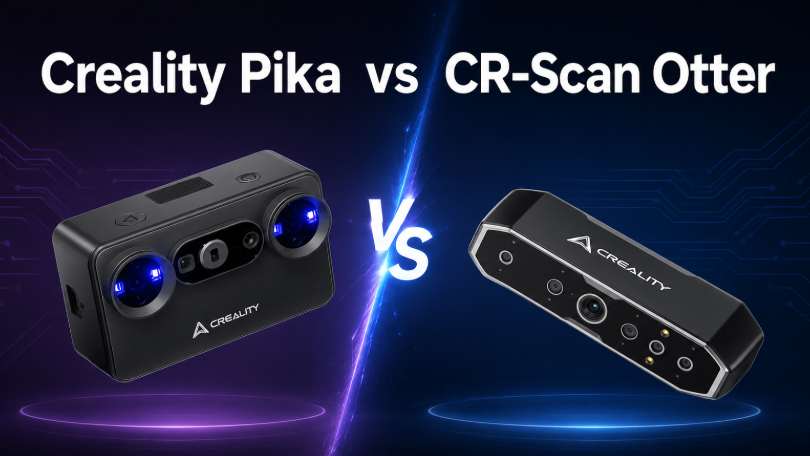

If you are comparing Creality Pika vs CR-Scan Raptor, the most important difference is not simply which scanner has the better specifications. The real question is which scanning workflow better matches your projects.
Creality Pika focuses on portability, flexible everyday scanning and a more mobile workflow. It combines blue-laser and NIR structured-light scanning with a built-in touchscreen, replaceable batteries, wireless connectivity and AI-assisted processing features.
CR-Scan Raptor places greater emphasis on geometric precision. Its blue 7-line laser system reaches a stated accuracy of up to 0.02 mm and a resolution as fine as 0.02 mm, making it especially attractive for small parts, mechanical components and reverse-engineering projects.
Quick Answer
Choose Creality Pika if portability, mobile scanning, easy setup and flexible everyday use matter most.
Choose CR-Scan Raptor if your priority is fine geometric detail, very small objects and precision-focused scanning.
Creality Pika vs CR-Scan Raptor: Key Differences
| Feature | Creality Pika | CR-Scan Raptor |
|---|---|---|
| Best for | Portable and everyday scanning | Precision and small-part scanning |
| Scanning technology | 7 parallel blue lasers + NIR structured light | Blue 7-line laser + NIR binocular structured light |
| Maximum stated accuracy | Up to 0.03 mm | Up to 0.02 mm |
| Finest stated resolution | 0.1 mm in blue-laser mode | 0.02 mm in blue-light mode |
| Minimum blue-light scan volume | 10 × 10 × 10 mm | 5 × 5 × 5 mm |
| Maximum scanning speed | Up to 110 fps on compatible PC | Up to 60 fps |
| Weight | Approx. 260 g | Approx. 372 g |
| Built-in display | 3-inch touchscreen | No |
| Battery | Two replaceable 3,350 mAh batteries | Powered through connected setup |
| Mobile workflow | Strong phone, tablet and PC support | More computer-oriented workflow |
Specifications and available features may vary depending on scanning mode, connected device, software version and operating conditions.
The Main Difference: Portability vs Precision
At first glance, Pika and Raptor appear quite similar. Both combine blue-light scanning with NIR technology, both can handle a wide range of objects, and both support colour scanning.
The difference becomes clearer when you look at what each product is designed to optimise.
Pika is designed to make capable 3D scanning easier to use in more places. Its lighter body, built-in screen, replaceable batteries and wireless connectivity reduce the amount of equipment required around the scanner.
Raptor is designed to push further toward fine geometric capture. Its 0.02 mm stated accuracy, 0.02 mm minimum blue-light resolution and smaller minimum scanning volume give it an advantage when tiny features and mechanical geometry matter most.
Where Creality Pika Stands Out
1. A More Portable Scanning Setup
Pika weighs approximately 260 g and measures around 100 × 60 × 35 mm. The compact body makes it easier to carry between a workshop, classroom, studio or outdoor scanning location.
The built-in 3-inch touchscreen also allows users to check device status and access parts of the scanning workflow without depending entirely on a computer.
Two replaceable 3,350 mAh batteries further support mobile scanning by allowing users to swap batteries instead of ending a scanning session when power runs low.
2. Faster Maximum Frame Rate
When connected to a compatible computer through USB 3.0, Pika's blue-laser mode can reach a stated scanning speed of up to 110 fps. Its mobile blue-laser workflow can reach up to 40 fps.
3. Marker-Free Laser Scanning in Compatible Workflows
Pika supports marker-free blue-laser scanning for suitable objects in wired PC mode. This can reduce preparation time when scanning objects with enough recognisable geometry for stable tracking.
4. Mobile and Creative Workflows
Pika is designed to work across Windows, macOS, Android and iOS workflows, making it particularly attractive for users who do not want every project tied to a fixed workstation.
It also places greater emphasis on AI-assisted post-processing and newer creative 3D workflows, including features such as AI retexturing, AI hole filling, AI body completion and Gaussian Splatting workflows on compatible systems.
Where CR-Scan Raptor Stands Out
1. Higher Stated Geometric Accuracy
Raptor's blue-light mode reaches a stated maximum accuracy of up to 0.02 mm at 100 mm, compared with Pika's stated maximum of up to 0.03 mm in blue-laser mode.
2. Finer 3D Resolution
Raptor reaches a stated blue-light resolution as fine as 0.02 mm. This makes it particularly useful when capturing small grooves, edges, fittings, connectors and other detailed geometry.
3. Better Suited to Very Small Objects
Raptor supports a stated minimum blue-light scanning volume of approximately 5 × 5 × 5 mm, while Pika begins at approximately 10 × 10 × 10 mm.
This advantage becomes relevant for users scanning small mechanical parts, miniatures, connectors, fittings and other compact components.
What About Black and Metallic Objects?
Dark and metallic surfaces are traditionally difficult for optical 3D scanners because they can absorb or reflect projected light in ways that reduce tracking quality.
Both Pika and Raptor are designed to scan many black and metallic surfaces without requiring scanning spray.
However, highly reflective, mirror-like or transparent materials may still require temporary surface treatment. “Scan without spray” should therefore not be interpreted as meaning that every surface can be scanned without preparation.
Which Scanner Fits Your Project?
| Application | Better Fit | Main Reason |
|---|---|---|
| Portable everyday scanning | Pika | Smaller, lighter and battery powered |
| Small mechanical parts | Raptor | Finer stated resolution |
| Reverse-engineering references | Raptor | Precision-focused geometry capture |
| 3D-printing references | Both | Depends on convenience vs detail |
| Mobile creative work | Pika | Mobile connectivity and portable design |
| Automotive scanning | Both | Raptor for details; Pika for easier movement |
| Outdoor scanning | Pika | Portable setup and high ambient-light capability |
Pika vs Raptor for 3D Printing
Both scanners can create scan data that can be used as part of a 3D-printing workflow.
Pika is particularly well suited to everyday object capture, creative modelling, props, figures and medium-sized replacement parts where portability and ease of scanning are important.
Raptor becomes more attractive for closely fitting mechanical components, small replacement parts, precision prototypes and reverse-engineering references.
Conclusion: Creality Pika or CR-Scan Raptor?
Pika and Raptor overlap in capability, but they are built around different priorities.
Creality Pika is the more portable and flexible option. Its lightweight design, built-in touchscreen, replaceable batteries, mobile connectivity and creative processing features make it particularly suitable for makers, creators and users who regularly scan away from a fixed workstation.
CR-Scan Raptor is the more precision-focused option. Its finer stated blue-light resolution, higher stated maximum accuracy and smaller minimum scanning volume make it particularly attractive for mechanical parts, fine geometry and reverse-engineering references.
Choose Pika when mobility, convenience and versatility matter most.
Choose Raptor when fine geometry and small-object detail matter most.
Frequently Asked Questions
Which scanner is more accurate?
CR-Scan Raptor has the higher stated maximum accuracy. Its blue-light mode reaches up to 0.02 mm, while Pika reaches up to 0.03 mm in blue-laser mode.
Which scanner is better for small objects?
Raptor has an advantage for very small objects because of its finer stated resolution and minimum blue-light scanning volume of approximately 5 × 5 × 5 mm.
Can both scanners scan black or metallic objects?
Yes. Both are designed to capture many dark and metallic surfaces without scanning spray, although extremely reflective or transparent materials may still require preparation.
Which scanner is easier for mobile scanning?
Pika is more strongly designed around mobile scanning thanks to its lighter body, built-in display, replaceable batteries and support for phone and computer workflows.
Can scanned models be edited in CAD software?
Yes. Scan data can be imported into compatible modelling and reverse-engineering workflows. However, scanned mesh data is different from a native parametric CAD model, so users may still need to rebuild or modify geometry depending on the project.